Private AI · Works offline

The future of AI,
in the palm of your hand.

Chat with your documents, get instant summaries and ask out loud — all on your iPhone, iPad or Mac. No cloud. No account. No internet needed.

Download on the App Store $4.99 once. No subscription.
  • Data Not Collected
  • Face ID lock
  • Works in airplane mode
  • iPhone · iPad · Mac
  • 8 languages
Airplane mode on
0bytes of your data collected
28open AI models to choose from
31Bparameters — largest model on Mac
8languages
$4.99once — no subscription

How it works

Not just a chatbot.
An AI that reads your documents.

Drop in a contract, a manual or a report. Ask in your own words — typos included. Every answer comes from your file, with the source one tap away.

1

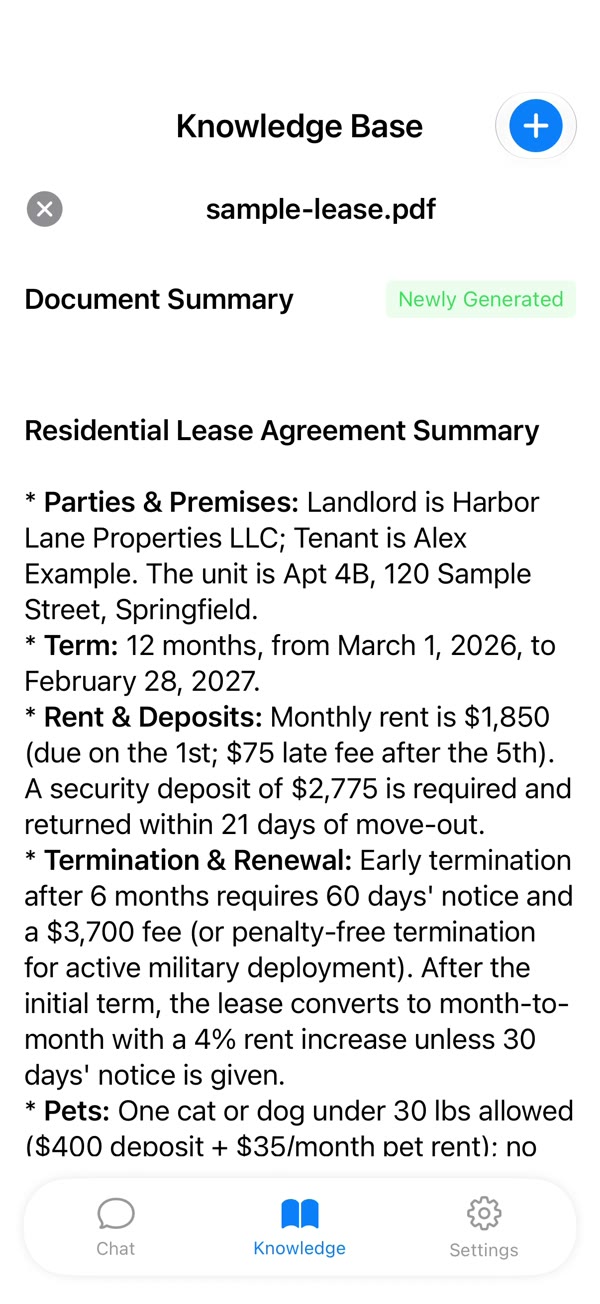
Add a PDF

Import from Files and get an automatic summary.

Automatic summary of a lease agreement
2

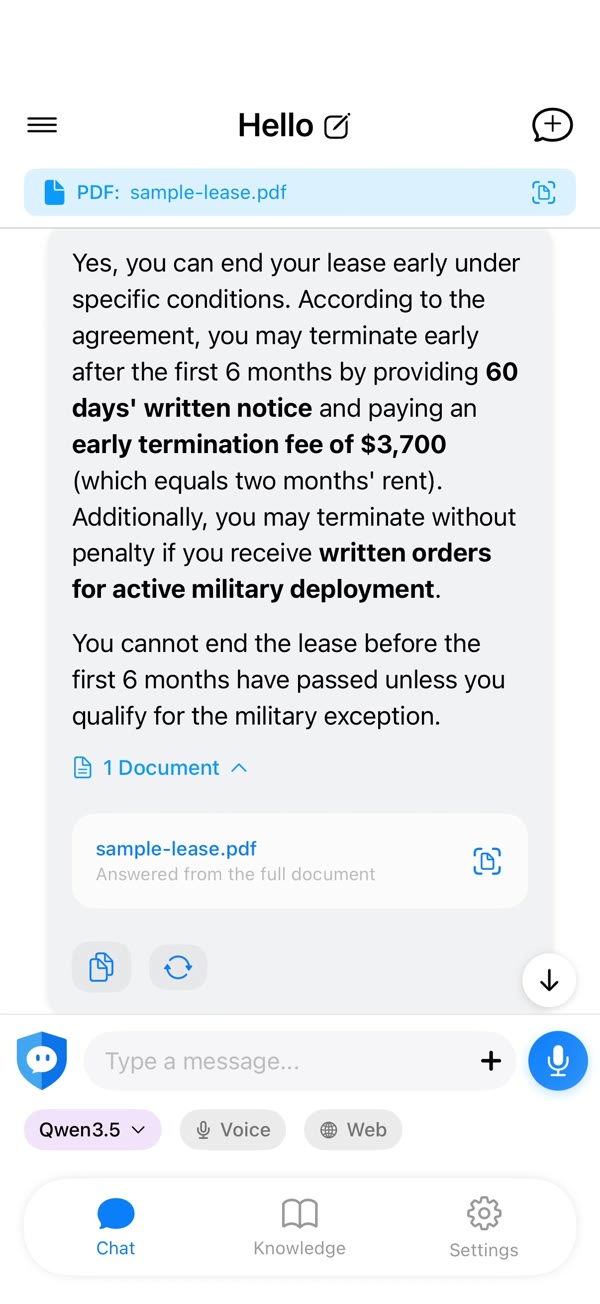
Ask anything

“Can I end my lease early?” — answered from the full document.

Answer about early termination with the lease as source
3

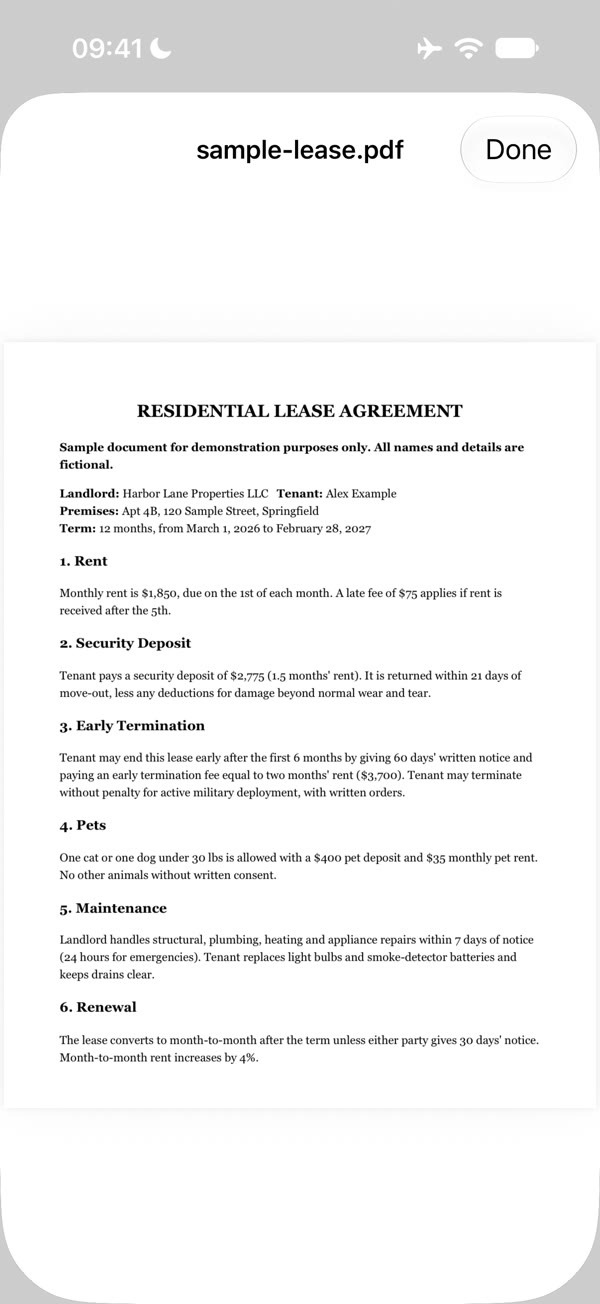
Check the source

One tap opens the document behind the answer.

The source PDF opened from the answer

Watch · 30 seconds

Middle of the ocean? No internet? No problem.

With most AI apps, your data leaves your phone. BastionChat runs the AI model on the device itself, so it works anywhere — and your files stay yours.

  • Nothing is uploaded — not your documents, not your questions
  • Works on a plane, at sea, in the field
  • No account, no sign-up, no usage limits

Features

Everything you need. Nothing that leaves.

Chat with your documents

PDFs, web pages and text. Small documents are read in full, large ones are searched — so answers stay grounded in your files.

Instant summaries

Turn a long contract or report into the key points — parties, dates, amounts, conditions.

Just ask out loud

Voice mode for hands-free questions — speech recognition runs on your device too.

Works offline

Airplane mode, no signal, no Wi-Fi — the AI is on the device, so it keeps working.

Understands images

Snap a photo or pick a screenshot and ask about it. Vision models describe, read and explain — on device.

Reads scanned PDFs

No selectable text? Built-in text recognition reads scanned pages, without sending them anywhere.

Thinks when it matters

Instant answers for everyday questions, or let the model reason step by step on the hard ones. Off, Short or Full — your call.

Built for power users

Pick from a curated model catalog or import any GGUF from Hugging Face. Calculator and MCP tools for agent workflows.

Web search, only if you want it

Off by default. Turn it on when you need live information — everything else stays on the device.

Under the hood

The Bastion Harness.

Not a wrapper around someone else's API. A complete AI stack — engine, memory and agent — compiled for Apple silicon and running entirely on your device.

Your iPhone · iPad · Mac — nothing leaves this box
Type Speak on-device speech Show a photo vision Add documents PDF · web · text

Memory

Knowledge engine

  1. Read PDFs, web pages and text — scanned pages via on-device OCR
  2. Chunk into passages, page by page
  3. Embed each passage with MiniLM on Core ML
  4. Index in a libSQL vector database (cosine, top-k) + FTS5 full-text
  5. Rank with hybrid keyword + semantic scoring

Agent

Bastion Harness

  • RouterSmall file? Read it whole. Big library? Hybrid search. Needs an action? Tools.
  • Context plannerFits every turn into the model's memory, measured with the real tokenizer.
  • Thinking controlOff · Short · Full — instant answers or step-by-step reasoning.
  • Tool runtimeDocuments · Calculator · Web (opt-in) · MCP servers.
  • Stream parserSeparates thinking, answers and tool calls as tokens arrive.

Engine

Inference engine

  • llama.cppNative, compiled for Apple silicon.
  • Metal GPUEvery layer offloaded, tuned per device.
  • Flash AttentionFaster, leaner long conversations.
  • Compressed KV cacheBigger models in less memory.
  • GGUF modelsFrom 270M to 31B parameters, with vision.
Answer with its source Spoken reply on-device voice Chat history local SQLite
Opt-in only: web search → internet

iPhone · iPad · Mac

One app. All your Apple devices.

Buy once and use it everywhere. BastionChat picks models that fit each device — the more memory, the bigger the brain.

iPhone

Fast, compact models for answers on the go — in your pocket, even in airplane mode.

iPad

A bigger screen and larger models for reading reports, papers and contracts side by side.

Mac

On Apple silicon, run large models — up to 27 billion parameters with enough memory — for deep research.

Made for

Places the cloud can’t reach.
Files the cloud shouldn’t see.

At sea & in the air

Sailors, pilots and travellers with no connection.

Confidential work

Contracts, medical and financial documents that must stay private.

In the field

Manuals and procedures, answered on site — even underground.

Study & research

Summarise papers and course notes anywhere.

Privacy

Where does your data go?

Your documents and conversations stay on your device. Apple’s App Store privacy label for BastionChat reads “Data Not Collected”.

Typical cloud AI appBastionChat
Your documents & questionsSent to remote serversStay on your device
Works without internetNoYes
Account requiredUsuallyNever
PriceOften a monthly subscription$4.99 once

Open models

Pick the brain that fits your device.

BastionChat recommends the right model for your iPhone, iPad or Mac and downloads it once. After that, everything runs locally.

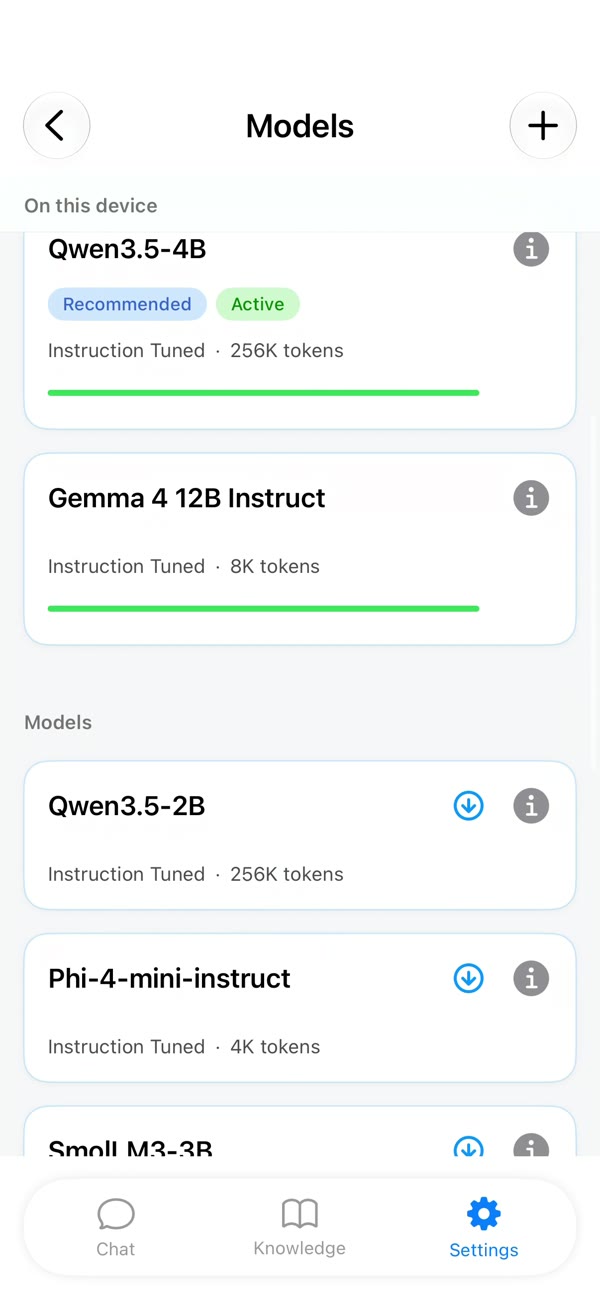
Qwen 3.5Gemma 4Phi-4 mini SmolLM3LFM 2.5Up to 27B on Mac + Bring your own GGUF
Model list in BastionChat

Built on open source: llama.cpp · Qwen · Gemma · Hugging Face · all licenses

New in version 1.1

Bigger brains, sharper eyes.

  • Image understanding — ask about photos and screenshots with vision models.
  • Adjustable thinking — instant answers, or step-by-step reasoning when you need it.
  • Larger models — up to 27B on Mac and iPad, with faster Metal GPU inference and lower memory use.
  • Optional web search — live information when you turn it on, nothing when you don’t.

FAQ

Questions, answered.

Does it need an internet connection?

Only once, to download a model. After that, chatting, documents, summaries and voice all work offline. Web search is optional and off by default.

Is any of my data collected?

No. Your documents and conversations are processed and stored on your device. BastionChat’s App Store privacy label is “Data Not Collected”.

Can I lock the app with Face ID?

Yes. On iPhone and iPad, touch and hold the BastionChat icon and choose Require Face ID — the app then opens only with Face ID or Touch ID, and its content stays hidden from notifications and search.

Which devices are supported?

iPhone and iPad with iOS / iPadOS 18 or later, and Macs with Apple silicon. Newer devices with more memory can run larger, smarter models.

How much does it cost?

$4.99, once. No subscription, no usage limits, and Family Sharing for up to six people.

How accurate are the answers?

On-device models are fast and capable, but like any AI they can make mistakes. That’s why every document answer links back to its source, so you can check it in one tap.

Which languages does the app support?

English, French, German, Spanish, Italian, Portuguese, Japanese and Korean.

BastionChat icon

Your data. Your device.
Your AI.

Private AI that works anywhere — even in the middle of the ocean.

Download on the App Store $4.99 once. No subscription.